
By Shaan Khan
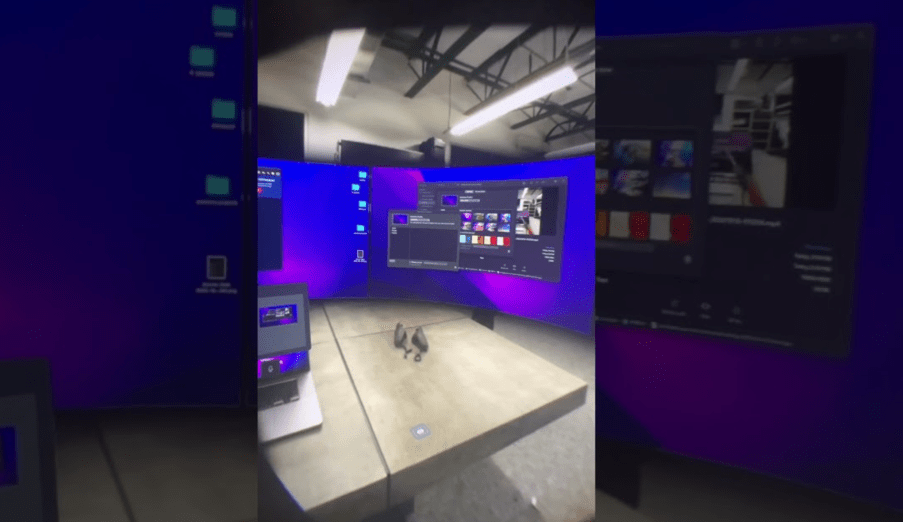
Screenshot Courtesy of Marquez Brownlee on YouTube
In October 2022, Multi-billion-dollar tech company Meta officially launched the Meta Quest Pro—a mixed reality (MR) headset ready for commercial use—bringing users the ability to transition between virtual and augmented realities on a single headset that contains cameras and displays.
One feature of the Meta Quest Pro that caught the most attention was Passthrough Mode using the Workspace App—enabling users to add virtual displays to their real-world workspace in extension of their physical computer display, i.e. laptop.
What makes this AR feature so wildly sought after for work productivity and can it be used to replace physical monitors?
The Importance of Screen Real Estate for Productivity
- Microsoft researchers conducted tests that proved user productivity was boosted up to 50% when using multiple monitors.
- A study from Wichita State University concluded that performance was boosted for participants when multiple monitors were introduced—with over 98% of participants preferring dual monitor configurations.
‘Multiple screens were significantly more usable than single screen on measures of effectiveness, comfort, learning ease, time to productivity, mistake recovery and other factors’ – Researchers at the University of Utah
The Screen Real Estate Advantage of Meta Quest Pro
The Meta Quest Pro allows you to have multiple monitors wherever you go. The virtual monitors seamlessly work in collaboration with your computer. For instance, the MacOS & Windows feature to snap windows into tiles also works on the virtual displays. Also, your mouse pointer can smoothly transition between monitors.
Why spend money on monitors that take up space and are difficult to travel with compared to this MR headset that can poof virtual monitors from thin air whether you’re lying in bed or seated in a plane?
The Disadvantages of Passthrough Mode on the Meta Quest Pro
In reality, the Meta Quest Pro is not ready to replace most people’s workspaces. Despite comfortability being subjective when it comes to the device, many will struggle with wearing it for multiple hours due to the headset’s weight, screen resolution not being sharp enough or having your virtual monitors move around when you’re in an active vehicle.
The biggest issue all users face is physical surroundings captured in the camera are not entirely clear; this is problematic when attempting to look at your keyboard and noticing the keys look blurry—leading to mistyping.
Best Way to Utilise the Passthrough Mode for Productivity
Multiple physical monitors are still the most viable option for a workspace requiring long work hours. However, those with digital jobs, online businesses or WFH can benefit from having multiple monitors in a pinch wherever you are with the power of the Meta Quest Pro.
To best optimise productivity, you now have an option more viable than a single smartphone or laptop for on-the-go work productivity—relinquishing the anxiety from being away from your primary workspace.
So whether you’re commuting to work and want to get a head’s start on the day, perhaps wanting to check up on your business while away on holiday after an important call from an investor—the Meta Quest Pro can come in clutch with this passthrough mode in short-term work usage. I would recommend between 1-2 hours per work session with the Meta Quest Pro.
 Shaan Khan
Leave a comment